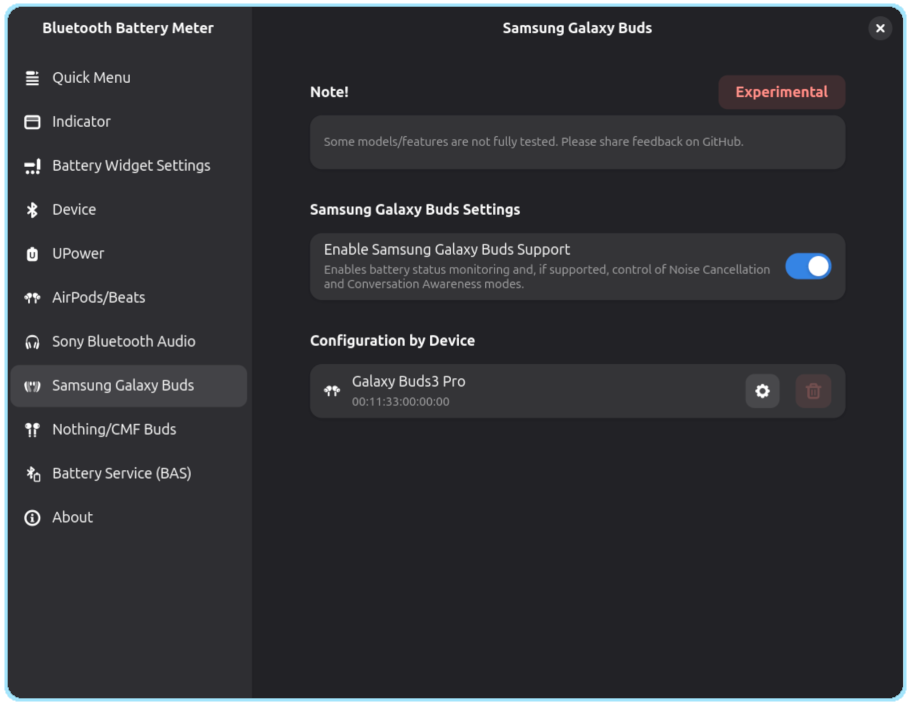
Samsung Galaxy Buds
Samsung Galaxy Buds Popup

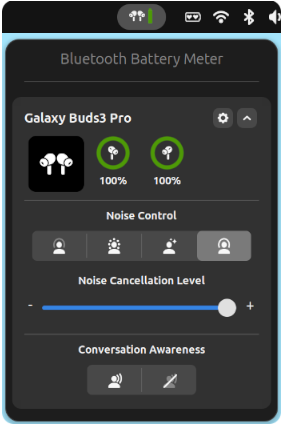
- The popup can appear in multiple modes: On-Hover, Panel Button, and/or Bluetooth Submenu.
- It shows a circular battery widget, supporting either a single battery (headset) or three separate levels for Left, Right, and Case.
- The case battery is shown only when the buds report it, usually when the case is charging or when at least one bud is inside.
- Conversation Awareness in Samsung Galaxy Buds term is Voice Detect.
Samsung Galaxy Buds ANC and Conversation Awareness
- Not all features are supported in every mode. Some features may be unavailable depending on the selected mode.
Button Visibility
- The Noise Control option (if supported) is only shown when one or both earbuds are in the ears.
- The Conversation Mode (if supported) option is only shown when both earbuds are in the ears.
Icons:
Anti-Noise Cancellation (ANC)
![]() | Anti-Noise Cancellation Off |
![]() | Anti-Noise Cancellation On |
![]() | Transperancy |
![]() | Adaptive |
Conversation Awareness
![]() | Conversation Awareness On |
![]() | Conversation Awareness Off |
Samsung Galaxy Buds Preferences

When enabled, the system detects Galaxy Buds devices among connected Bluetooth devices. It communicates over RFCOMM sockets to support features such as:
- Battery level reporting
- In-ear detection for automatic pause/play of media
- Control of ANC (Active Noise Cancellation) mode (if supported)
- Conversation Awareness mode (if supported)
- Adaptive noise level customization (if supported)
Configuration by Device
Configure per device settings if supported

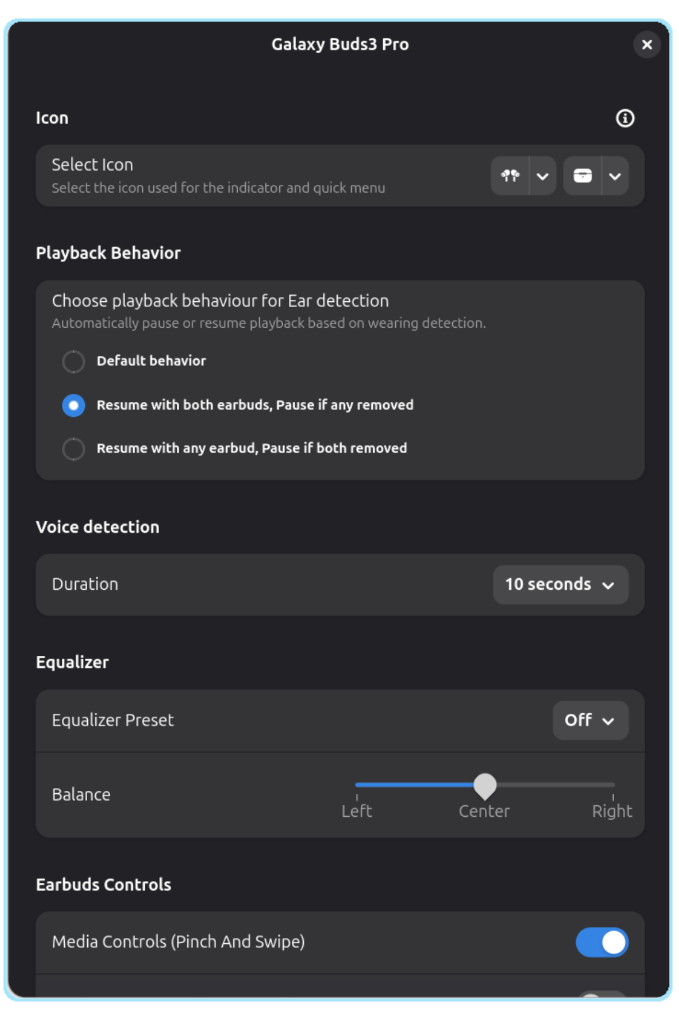
Icon selection
Choose which icon style to display in the panel and quick menu:
- Device icons: Select from the available options for your headset type (single-battery or dual-battery devices).
- Case icon: For models that report a case battery, an additional case icon can be selected.
These options let you customize how your device appears in the indicator.
Pause when device is not worn
When enabled, media playback automatically pauses when the earbuds are removed and resumes based on the selected behavior:
- Default behavior: Uses the device’s standard in-ear detection for pausing and resuming.
- Resume with both earbuds: Playback resumes only when both earbuds are worn.
- Resume with any earbud: Playback resumes as soon as at least one earbud is worn.
Conversation awareness volume Limit
If supported by device, this setting limits media volume during active conversations to enhance awareness of your surroundings and reduce distractions.
When conversation mode is triggered (based on supported device capabilities), the system automatically reduces media volume to a user-defined percentage of the maximum volume.
This helps ensure you can still hear important external sounds while music or other media is playing.
Adjustable Range
- You can set the volume limit to any value between 0 and 50.
- Values are interpreted as a percentage of the device’s maximum volume.
- Note: If the current playback volume is already below the specified limit, no adjustment will be made.
Other settings:
Other settings are self explanatory similar to settings available in iPhone / iPads / Macs
Compatibility
Currently tested and confirmed working:
- Galaxy Buds 4 Pro ✅ — Credits: NormalHuman-Anything
- Galaxy Buds Pro ✅ — Credits: NormalHuman-Anything
- Galaxy Buds 3 Pro ✅ — Credits: kacpero1530
- Galaxy Buds 3 ✅ — Credits: kacpero1530
- Galaxy Buds 2 Pro ✅ — Credits: kacpero1530
- Galaxy Buds Live (Partially tested) ❌ — Credits: adlr
- Galaxy Buds FE (Partially tested) ❌ — Credits: kerembayulgen
Galaxy Buds
| Feature | Supported | Tested |
|---|---|---|
| Battery Level | ✅ | ❌ |
| Ambient sound | ✅ | ❌ |
| In Ear Detection | ✅ | ❌ |
| Equalizer Preset | ✅ | ❌ |
Galaxy Buds+
| Feature | Supported | Tested |
|---|---|---|
| Battery Level | ✅ | ❌ |
| Ambient sound | ✅ | ❌ |
| Ambient Sound During Calls | ✅ | ❌ |
| In Ear Detection | ✅ | ❌ |
| Equalizer Preset | ✅ | ❌ |
Galaxy Buds Live
| Feature | Supported | Tested |
|---|---|---|
| Battery Level | ✅ | ❌ |
| Noise Cancellation | ✅ | ❌ |
| In Ear Detection | ✅ | ❌ |
| Equalizer Preset | ✅ | ❌ |
| Stereo Balance | ✅ | ❌ |
Galaxy Buds Pro
| Feature | Supported | Tested |
|---|---|---|
| Battery Level | ✅ | ✅ |
| Noise Cancellation | ✅ | ✅ |
| Ambient sound | ✅ | ✅ |
| Ambient Sound During Calls | ✅ | ❌ |
| Noise Controls With One Earbud | ✅ | ❌ |
| In Ear Detection | ✅ | ✅ |
| Double Tap Volume | ✅ | ✅ |
| Equalizer Preset | ✅ | ❌ |
| Stereo Balance | ✅ | ❌ |
Galaxy Buds2
| Feature | Supported | Tested |
|---|---|---|
| Battery Level | ✅ | ❌ |
| Noise Cancellation | ✅ | ❌ |
| Ambient sound | ✅ | ❌ |
| Ambient Sound During Calls | ✅ | ❌ |
| Noise Controls With One Earbud | ✅ | ❌ |
| In Ear Detection | ✅ | ❌ |
| Touch Lock Settings | ✅ | ❌ |
| Touch Configuration | ✅ | ❌ |
| Double Tap Volume Settings | ✅ | ❌ |
| Find My Buds | ✅ | ❌ |
| Equalizer Preset | ✅ | ❌ |
| Stereo Balance | ✅ | ❌ |
Galaxy Buds2 Pro
| Feature | Supported | Tested |
|---|---|---|
| Battery Level | ✅ | ✅ |
| Noise Cancellation | ✅ | ✅ |
| Ambient sound | ✅ | ✅ |
| Ambient Sound During Calls | ✅ | ❌ |
| Noise Controls With One Earbud | ✅ | ❌ |
| In Ear Detection | ✅ | ✅ |
| Touch Lock Settings | ✅ | ✅ |
| Touch Configuration | ✅ | ✅ |
| Double Tap Volume Settings | ✅ | ✅ |
| Find My Buds | ✅ | ✅ |
| Equalizer Preset | ✅ | ✅ |
| Stereo Balance | ✅ | ✅ |
Galaxy Buds FE
| Feature | Supported | Tested |
|---|---|---|
| Battery Level | ✅ | ❌ |
| Noise Cancellation | ✅ | ❌ |
| Ambient sound | ✅ | ❌ |
| Ambient Sound During Calls | ✅ | ❌ |
| Noise Controls With One Earbud | ✅ | ❌ |
| In Ear Detection | ✅ | ❌ |
| Touch Lock Settings | ✅ | ❌ |
| Touch Configuration | ✅ | ❌ |
| Find My Buds | ✅ | ❌ |
| Equalizer Preset | ✅ | ❌ |
| Stereo Balance | ✅ | ❌ |
Galaxy Buds3
| Feature | Supported | Tested |
|---|---|---|
| Battery Level | ✅ | ✅ |
| Noise Cancellation | ✅ | ✅ |
| In Ear Detection | ✅ | ✅ |
| Gesture Configuration | ✅ | ✅ |
| Find My Buds | ✅ | ✅ |
| Equalizer Preset | ✅ | ✅ |
| Stereo Balance | ✅ | ✅ |
Galaxy Buds3 Pro
| Feature | Supported | Tested |
|---|---|---|
| Battery Level | ✅ | ✅ |
| Noise Cancellation | ✅ | ✅ |
| Ambient sound | ✅ | ✅ |
| Ambient Sound During Calls | ✅ | ❌ |
| Noise Controls With One Earbud | ✅ | ❌ |
| In Ear Detection | ✅ | ✅ |
| Gesture Configuration | ✅ | ✅ |
| Lighting Control | ✅ | ✅ |
| Find My Buds | ✅ | ✅ |
| Equalizer Preset | ✅ | ✅ |
| Stereo Balance | ✅ | ✅ |
Galaxy Buds3 FE
| Feature | Supported | Tested |
|---|---|---|
| Battery Level | ✅ | ❌ |
| Noise Cancellation | ✅ | ❌ |
| Ambient sound | ✅ | ❌ |
| Ambient Sound During Calls | ✅ | ❌ |
| Noise Controls With One Earbud | ✅ | ❌ |
| In Ear Detection | ✅ | ❌ |
| Gesture Configuration | ✅ | ✅ |
| Find My Buds | ✅ | ❌ |
| Equalizer Preset | ✅ | ❌ |
| Stereo Balance | ✅ | ❌ |
Galaxy Buds Core
| Feature | Supported | Tested |
|---|---|---|
| Battery Level | ✅ | ❌ |
| Noise Cancellation | ✅ | ❌ |
| Ambient sound | ✅ | ❌ |
| Ambient Sound During Calls | ✅ | ❌ |
| Noise Controls With One Earbud | ✅ | ❌ |
| In Ear Detection | ✅ | ❌ |
| Find My Buds | ✅ | ❌ |
| Touch Lock Settings | ✅ | ❌ |
| Touch Configuration | ✅ | ❌ |
| Equalizer Preset | ✅ | ❌ |
| Stereo Balance | ✅ | ❌ |
Galaxy Buds4
| Feature | Supported | Tested |
|---|---|---|
| Battery Level | ✅ | ❌ |
| Noise Cancellation | ✅ | ❌ |
| Ambient sound | ✅ | ❌ |
| Ambient Sound During Calls | ✅ | ❌ |
| Noise Controls With One Earbud | ✅ | ❌ |
| In Ear Detection | ✅ | ❌ |
| Find My Buds | ✅ | ❌ |
| Gesture Configuration | ✅ | ❌ |
| Equalizer Preset | ✅ | ❌ |
| Stereo Balance | ✅ | ❌ |
Galaxy Buds4 Pro
| Feature | Supported | Tested |
|---|---|---|
| Battery Level | ✅ | ✅ |
| Noise Cancellation | ✅ | ✅ |
| Ambient sound | ✅ | ✅ |
| Ambient Sound During Calls | ✅ | ❌ |
| Noise Controls With One Earbud | ✅ | ❌ |
| In Ear Detection | ✅ | ✅ |
| Gesture Configuration | ✅ | ❌ |
| Find My Buds | ✅ | ❌ |
| Equalizer Preset | ✅ | ❌ |
| Stereo Balance | ✅ | ❌ |