#Install from Flathub (Recommended)
Using Desktop Software Centers
Using Desktop Software Centers BudsLink can be installed using graphical software managers such as GNOME Software or KDE Discover.
- Open your system’s software center
- Search for “BudsLink”
- Click Install
Using the Command Line
Ensure Flatpak is installed and Flathub is configured:
#Fedora
sudo dnf install flatpak

# Ubuntu
sudo apt install flatpak
Add Flathub (if not already configured):
flatpak remote-add --if-not-exists flathub https://flathub.org/repo/flathub.flatpakrepo
Install BudsLink:
flatpak install flathub io.github.maniacx.BudsLink
Run the application:
flatpak run io.github.maniacx.BudsLink
Installing from a Local Flatpak Bundle
Supported Architectures
BudsLink Flatpak builds are provided for:
- x86_64 – standard 64-bit Intel/AMD CPUs
- aarch64 – 64-bit ARM CPUs, commonly used in modern ARM laptops and single-board computers
Installing BudsLink Flatpak from Github Release
Download the appropriate .flatpak file from the GitHub release page corresponding to your CPU architecture. These Flatpak bundles are automatically built for each release using the GitHub workflow. Before installing BudsLink, make sure Flatpak is installed and the Flathub remote is added.
Install Flatpak:
# Fedora
sudo dnf install flatpak

#Ubuntu
sudo apt install flatpak
Add the Flathub repository (if not already added):
flatpak remote-add --if-not-exists flathub https://flathub.org/repo/flathub.flatpakrepo
Install the Flatpak locally:
For Intel/AMD CPUs:
flatpak install --user --reinstall /path/to/BudsLink-vX.Y.Z-x86_64.flatpak
For ARM-based CPUs (e.g., Mac running Asahi Linux or Chromebooks):
flatpak install --user --reinstall /path/to/BudsLink-vX.Y.Z-aarch64.flatpak
Run BudsLink:
flatpak run io.github.maniacx.BudsLink
Building BudsLink from Source using Flatpak Builder
If you want to build BudsLink from source, you can use Flatpak Builder. The GitHub workflow uses a manifest file io.github.maniacx.BudsLink.yml for this purpose.
Install Flatpak Builder:
#Fedora
sudo dnf install flatpak-builder

#Ubuntu
sudo apt install flatpak-builder
Add Flathub Remote (if not already added):
flatpak remote-add --user --if-not-exists flathub https://flathub.org/repo/flathub.flatpakrepo
Install GNOME SDK and Platform (if not already installed):
If you already use GNOME Flatpak applications, these may already be installed.
flatpak install --user org.gnome.Platform//50 org.gnome.Sdk//50 -y
Download / Clone BudsLink repository:
Download and Extract the Budslinks repo using download link on Github OR use Git clone
git clone https://github.com/maniacx/BudsLink.git
Build and Install the Flatpak:
Change directory to path/to/BudsLink and run the command below.
cd BudsLink
flatpak-builder --user --install --state-dir="localdata/flatpak" "localdata/build" io.github.maniacx.BudsLink.yml
The --state-dir="localdata/flatpak" and "localdata/build" flags will create the build directory and cache inside the localdata folder, which can be deleted after building.
Run the locally built Flatpak:
flatpak run io.github.maniacx.BudsLink
BudsLink Flatpak Permissions
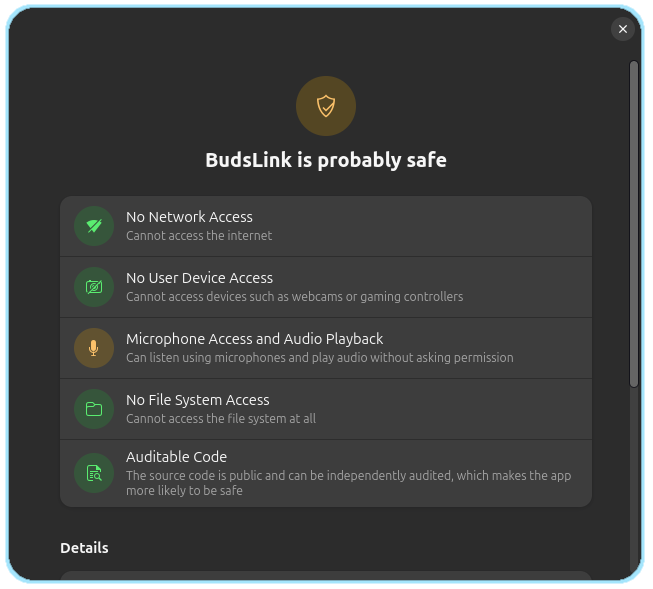
Mic Access and Audio Playback
This application does not record audio, does not listen to the microphone, and does not access any input streams.
The app store may still show this application as having access to microphone and audio playback. This is a limitation of Flatpak’s audio permission model.
The application requires --socket=pulseaudio only to inspect audio cards and sinks, detect the default output device, determine whether a Bluetooth device is using the A2DP profile, and read or adjust volume and mute status (for features such as conversation awareness).
Flatpak does not provide separate permissions for audio control versus microphone access. As a result, the permission appears broader than its actual usage, even though the microphone is never accessed.