Bluetooth Battery Meter


Currently supported on Gnome Versions:
Supported:
43, 44, 45, 46, 47, 48, 49, 50, 51Deprecated:
42
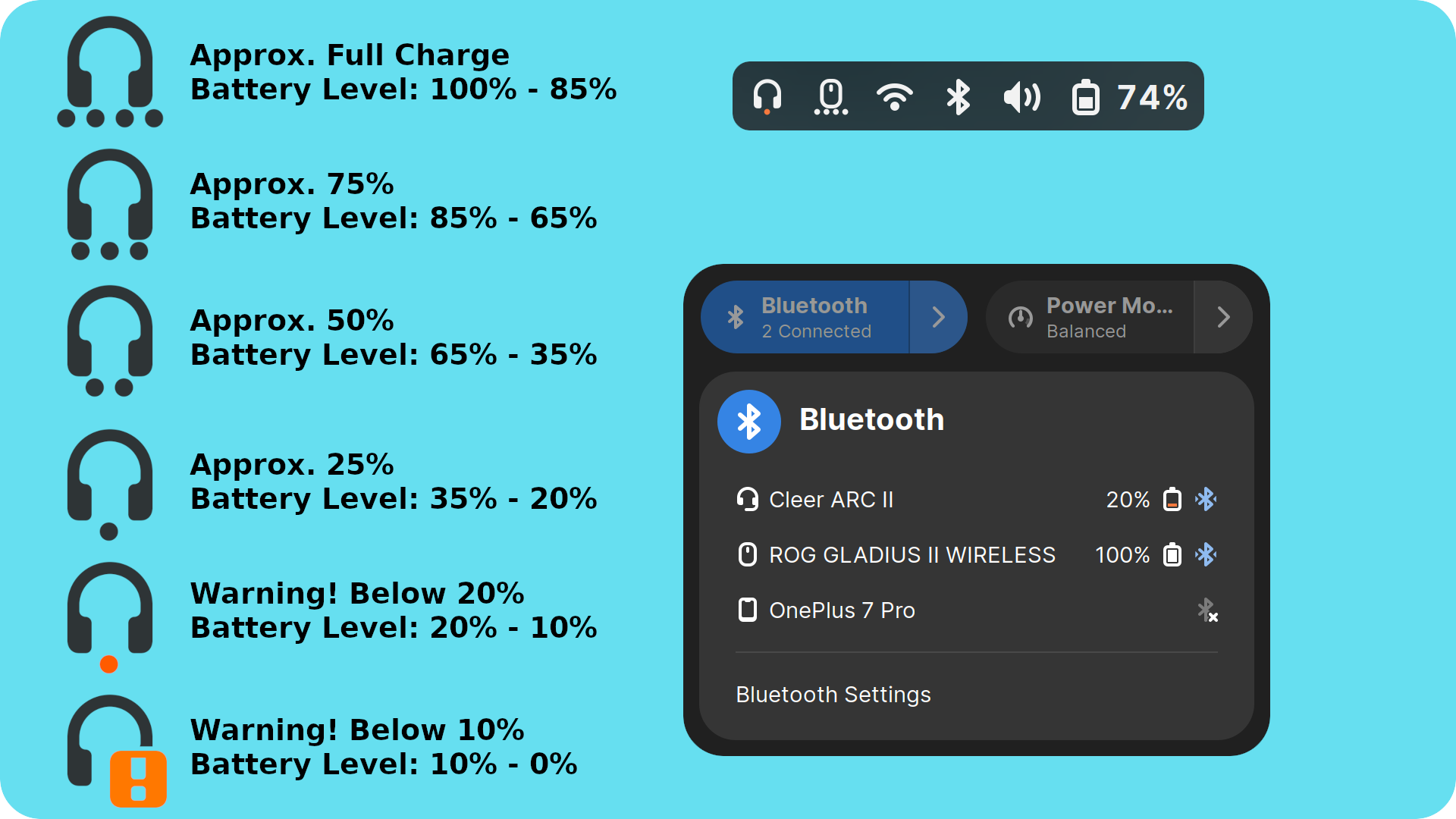
Bluetooth Battery Meter is a Gnome Extension featuring indicator icons in system tray, serving as meter for Bluetooth device battery levels and providing detailed battery levels via icon/text in the Bluetooth quick settings menu.
Important Notes
- Certain Bluetooth devices report battery levels in different increments.
- One would expect a continuous discharge reading like 100, 99, 98, 97… down to 0.
- However manufacturers often design devices to report in specific increments.
- Some devices may report battery levels in increments of 5 (e.g., 100, 95, 90, 85… to 0)
- Some devices may report battery levels in increments of 10 (e.g., 100, 90, 80, 70… to 0)
- Some devices may report battery levels in increments of 20 (e.g., 100, 80, 60, 40… to 0)
- For Quick settings percentage displayed in text (when enabled), might observe battery level stuck at a percentage example 100% for a while and later suddenly drop down to 80%, if designed for increment of 20%.
Disclaimer
This project is an independent effort and is not affiliated with, endorsed by, or sponsored by Apple, Sony, Samsung, Google, Nothing, Bose, Redmi, Xiaomi, Sennheiser, Edifier, Cambridge Audio, SoundCore, Realme, Oppo, or OnePlus. All product and company names are trademarks™ or registered® trademarks of their respective holders and are used for identification purposes only.
Major changes in Bluetooth Battery Meter v48 — BudsLink dependency
Starting with Bluetooth Battery Meter v48, device-specific features for AirPods, Sony, Samsung Galaxy Buds, Nothing/CMF, Bose, Redmi/Xiaomi, Sennheiser, and other supported devices require the BudsLink Flatpak app, available on Flathub, as a backend.
This change was made because the device-specific code had grown considerably, and socket-level Bluetooth communication and protocol handling are not ideal to run directly inside a GNOME Shell extension.
Benefits:
- Keeps the GNOME Shell extension lightweight and it can impact shell performance.
- Translators can concentrate on the app and extension instead of maintaining duplicate translations across two projects.
- Avoids duplicate documentation.
- GNOME reviewers do not have to deal with large code changes every time a new device or feature is added.
- Allows the author to focus on the app instead of maintaining two separate projects.
- Building and testing the app is easier and safer for development.
- Other distributions can also benefit from these features instead of being limited to GNOME-specific distributions.
Features:
Core Functions (Default Operation Mode)
Displays battery level (text/icon) reported by BlueZ in the system tray indicator and Bluetooth popup menu.
Configurable indicator style: battery bar or dots.
Customizable battery bar and dot colors.
Shows indicator for non-battery Bluetooth devices (e.g., keyboard, mouse) to reflect connection status.
Option to disable battery reporting per device.
Option to choose different icons for each Bluetooth device.
Panel Button
On-hover details
Multiple indicator mode
UPower Devices (Optional Mode)
When enabled, displays battery level in the system tray for non-Bluetooth UPower devices (e.g., Logitech Lightspeed keyboard/mouse).
Option to select a custom icon for the indicator.
Configurable indicator style: battery bar or dots.
Customizable battery bar and dot colors.
D-Bus GATT Battery Service (BAS) (Optional Mode)
- D-Bus GATT Battery Service (BAS): for standard Bluetooth devices that expose battery information via the GATT protocol.
BudsLink Companion — Extensive Device Support
Bluetooth Battery Meter acts as a BudsLink Companion for supported Bluetooth devices, providing their battery information and device controls directly within the GNOME Shell interface.
When the extension detects a compatible device, it automatically launches BudsLink in the background and keeps it running while the device is connected. When the device is disconnected, the extension stops BudsLink after a set delay.
The BudsLink application handles the device communication, Bluetooth protocol processing, and packet decoding. Bluetooth Battery Meter communicates with BudsLink through D-Bus, receiving device information and exposing the relevant data and controls through the GNOME Shell Quick Settings interface.
Supported device families include:
- AirPods / Beats
- Sony
- Samsung Galaxy Buds
- Nothing / CMF
- Bose
- Redmi / Xiaomi
- Sennheiser
- Edifier
- Realme / Oppo / OnePlus
- Cambridge Audio Melomania
- Soundcore